CCOM X Release 1-26
Release Notes – January 2026
New Year, New Insights.
Happy New Year! We hope 2026 has started well for everyone at sea and on shore. While December was about laying the groundwork, January is about giving you control and oversight.
We have listened to your feedback, especially from those of you who missed the specific "Monday Morning" overview from our previous version (2.0). We are bringing that back, smarter than before. We are also rolling out powerful new dashboard widgets that turn complex data into simple traffic lights for decision-making, and we have finally closed the loop on using spare parts directly in reports.
🌟 New Features
📧 The Additional "Monday Morning" Competence Update
By popular demand, we’re bringing back the proactive competence overview. Managers and shipping offices need visibility into expiring certificates before they become a problem — not after.
Additional Weekly Email: This update is sent as an extra email every Monday, in addition to the regular Monday email.
Department & Position Based: The email applies to selected departments and job positions, ensuring the overview is relevant for each role.
Department & Position Based: The email applies to selected departments and job positions, ensuring the overview is relevant for each role.
Beyond Your Own Status: Instead of only seeing yourself, you now get an overview of competencies that are expiring (or already expired) for the people and positions you are responsible for.
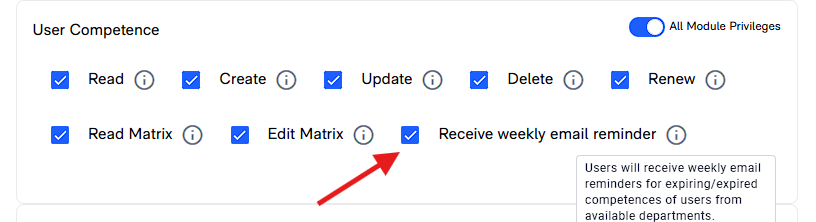
Configurable Recipients: The office decides which job positions receive the email by activating the update for the roles that need it.

To Receive additional e-mails, you have to enable a privilege on the job position:
📊 Dashboard: Visualizing Operational Risk
We are continuing our dashboard evolution. This month, we introduce two key widgets designed to give you an instant "health check" of your vessel or fleet and enable quick operational insight onboard.
Maintenance Status: Summarizes maintenance workload into clear status categories (Expired, Due Soon, Critical, Postponed, In Progress, Completed) and specifically highlights Due Soon and Expired jobs involving critical components, enabling sharper onboard prioritization and earlier intervention before issues escalate into failures or non-compliance. This also speeds up daily follow-up by showing exactly where the workload is building.
Reports Status: Clearly highlights Open, Due Soon and Expired reports so follow-ups don’t slip, and quickly visualizes reports where the user has a role, making lists more relevant and reducing the chance of unresolved reporting. It also provides a simple overview of reports created, completed, and closed within selected period to show whether reported issues are actually being processed and closed in the selected period, so you can spot growing backlog and operational risk early
🛠️ Spare Parts in Service Reports & Corrective Actions
We have closed a gap in the workflow between maintenance and reporting.
Direct Consumption: You can now register the use of Spare Parts directly within Corrective Actions and Service Reports.
Less Module Switching: If you fix something and use a part, you log it right there in the report — no need to jump between modules.
📋 The Great Due List Overhaul (Part 2)
Following up on December's work, we have now completed the "under-the-hood" rework of the Due Lists for almost all remaining modules. This includes Tasks, Drills, Certificates, Runtimes, Risk Assessments, and Work Schedules.
Why it matters: This ensures consistent behavior, better filtering, and faster loading times across the platform.
🛡️ Security & Privacy
Clearer Password Rules: We’ve added explanations of password requirements when creating or changing passwords.
Ongoing Improvements: Additional steps have been taken to strengthen security and privacy across the platform.
🐞 Bug Fixes & Improvements
⚓ Work & Rest
- Safari Support: Fixed an issue where "Sign Off" didn't work for users on Safari browsers.
- Empty Schedules: It is now possible to create empty Work Schedules when needed. This allows manual registration of all work hours per day instead of following a specified daily plan.
👥 Shift & Manning
- Sign-off Documents: Documents are now automatically removed when planned activity is deleted.
📄 Documents
- Privileges: Fixed a bug where documents could be disabled or enabled without the correct permissions.
- Department Restrictions: Editing department-specific documents no longer removes the department restriction.
- Version Comments: You’re now prompted to add a version comment when publishing a new version, improving history tracking.
📋 Reports
- Admin Access: Admin users can now edit, complete, and close reports even if their position isn’t responsible for follow-up and closing.
- Report Types: Removing a Report Type no longer affects already registered reports.
✔️ Tasks
- Duplicate Prevention: The Perform button is now disabled while a task is running to prevent duplicate log entries.
⚙️ System & UI
- Layout: Fixed scrollbar issues in Shift & Manning where content extended beyond the footer.
- Text Improvements: Updated notifications to say “Every Monday morning” and corrected various English typos.
- Performance: Improved frontend performance and optimized document loading.
🛠️ Other improvements
- Reports Over Time: Simplified by removing the trend label, making trends easier to read from the data.
- Custom Dates: Custom date range selection is now available across all widgets.
- Archived & Paused departments: will no longer be visible in dropdowns

Reminder: You can now also send both E-mail and SMS messages to:
- Entire organization
- Specific crews
- Specific groups
- Shifts
- Next of kin
Activation Required: To send messages, you must enable messaging privileges on the relevant job positions.
Once activated, a new Messages section will appear under Admin, where you can compose and send your messages.
We are full speed ahead into 2026. As always, thank you for your feedback!