CCOM X Release 6 - 2026
CCOM X Update: Flexibility, Stability and Smarter Workflows
This month is about making CCOM X more elastic to better accomodate changing operations aboard.
Despite June being packed with vacations and planning days that tend to keep those of us onshore away from work, we at CCOM have kept the pace up.
Your voice matters for the development of our platform, and this has never shown as clearly as now. Long requested features have arrived, bringing new options, more flexibility and increased stability in day to day operations.
Despite June being packed with vacations and planning days that tend to keep those of us onshore away from work, we at CCOM have kept the pace up.
🌟 New Features
⏸️ Pause Functionality
A long requested feature finally arrives.
CCOM X now supports pausing vessel operations for a specified duration - Enabling less noise, more focus and an overall better package.
A long requested feature finally arrives.
CCOM X now supports pausing vessel operations for a specified duration - Enabling less noise, more focus and an overall better package.
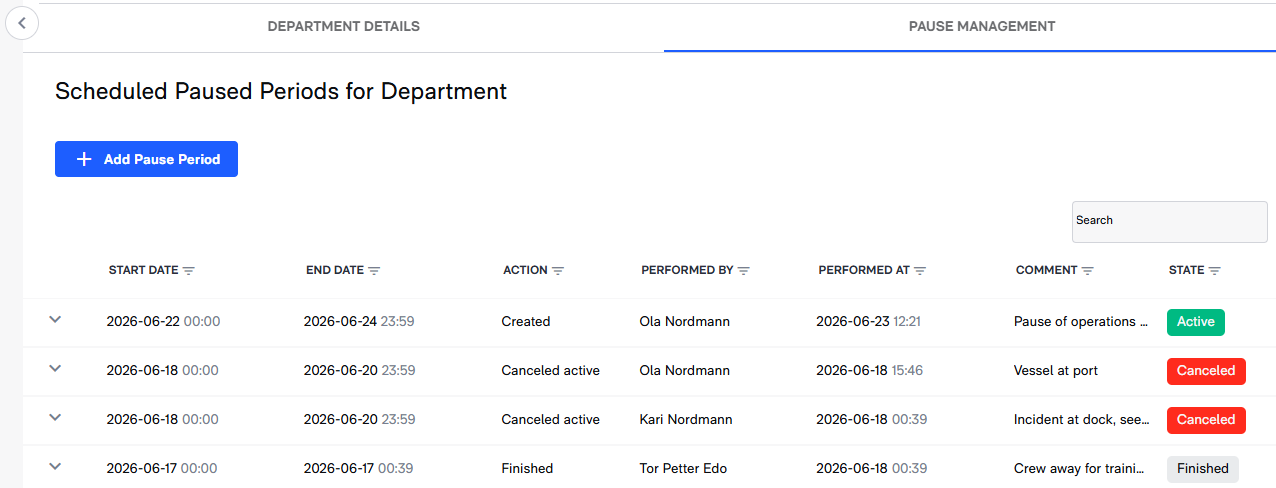
What’s included:
- Pausing departments or modules for a specified time range.
- Each module can be paused individually or multiple at the same time (Only for tasks currently, with more arriving in future updates)
- Pausing updates to dates for a department and skewing the dates for more realistic maintenance flow
- Maintenance and Drills will also get pause functionality in the near future.
- Paused departments and modules are clearly marked to make them easily distinguishable from normal operations.
- Filter options added for paused tasks
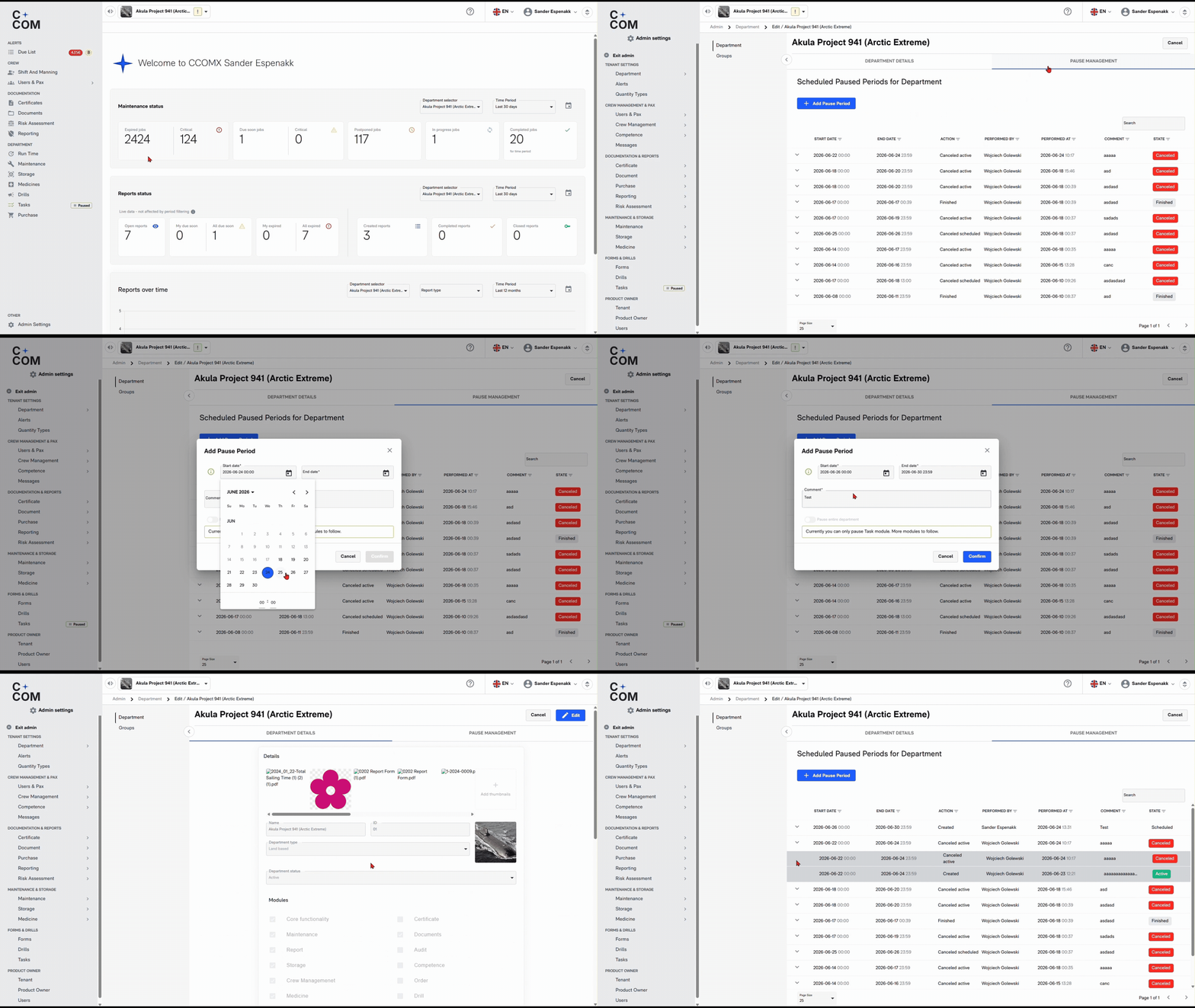
- Pausing departments or modules for a specified time range.
- Each module can be paused individually or multiple at the same time (Only for tasks currently, with more arriving in future updates)
- Pausing updates to dates for a department and skewing the dates for more realistic maintenance flow
- Maintenance and Drills will also get pause functionality in the near future.
- Paused departments and modules are clearly marked to make them easily distinguishable from normal operations.
- Filter options added for paused tasks
🔧 Corrective actions in Due List
- Corrective Actions will now be shown in the due list until it is completed
- Corrective Actions are available as a filter option
- Sorting functionality and due list overview available on all Departments page
👤 Adding new crewmembers have never been easier
Existing users can now be easily added through the Users & Pax module, thanks to improvements in how user profile data is handled.
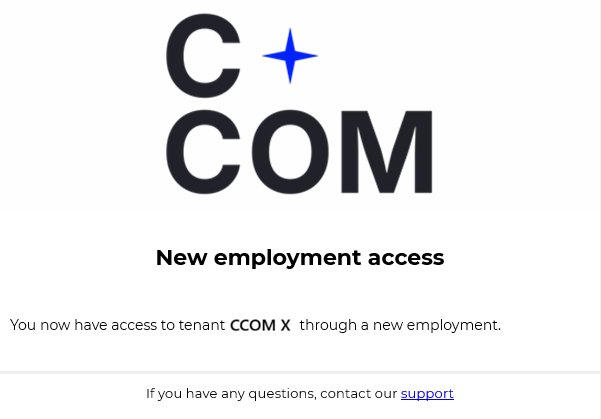
What’s New:- Users can now be added to a new company without conflicts with existing accounts.
- User management has been improved and now provides more precise control.
- Office staff and commanding officers no longer need to contact support when adding a crewmember who already has an existing CCOM X account.
Why it matters:Office staff and Commanding officers no longer need to contact support when adding a crewmember with an existing CCOM X account.
- Users can now be added to a new company without conflicts with existing accounts.
- User management has been improved and now provides more precise control.
- Office staff and commanding officers no longer need to contact support when adding a crewmember who already has an existing CCOM X account.
📋 Activity & Crewing – More Control
What’s improved:
- Time can now be added when creating an activity. Alleviating syncronisation issues when changing vessels.
- Errors related to same day changes are now easier to avaoid
Why it matters:
Increased stability and flexible planning.
What’s improved:
- Time can now be added when creating an activity. Alleviating syncronisation issues when changing vessels.
- Errors related to same day changes are now easier to avaoid
📑 Reporting & Crew Data – More Accurate Handling
- New notifications on the profile page for pending requests
- Improved handling of email changes
🛒 Storage and Purchase - Better flow, tighter integration
- Add part to order directly from the storage module
- Add to existing draft or create a new one with the parts you select
- Import options have been added to simplify inventory counts
- You can add multiple parts to the basket at a time
- We can now copy an existing order draft to make a clone. Increasing efficiency for repetitive orders.
The new options enables easier creation of purchase orders and simplifies inventory counting.
🐞 Bug Fixes & Improvements
⚓ Work & Rest
- Fixed an issue hindering deactivation of the module
- Fixed an issue where users could sign off without a signature
- Fixed an issue hindering deactivation of the module
- Fixed an issue where users could sign off without a signature
👥 Shift & Manning (ABSM)
- Solved an issue related to months with 31 days missing 1 day in the W&R Matrix view
- Added validation to ensure PAX onboard cannot be deleted until they are signed off the trip/activity
- Fixed an issue where vessels would see work schedules in their trips on vessels with W&R deactivated.
- Solved an issue related to months with 31 days missing 1 day in the W&R Matrix view
- Added validation to ensure PAX onboard cannot be deleted until they are signed off the trip/activity
- Fixed an issue where vessels would see work schedules in their trips on vessels with W&R deactivated.
🛠️ Maintenance
- Resolved an issue where job lists would break when a maintenance job had incomplete information
- Solved a problem when large amounts of data would leave some standard job templates stuck on loading
- Resolved an issue where job lists would break when a maintenance job had incomplete information
- Solved a problem when large amounts of data would leave some standard job templates stuck on loading
📄 Documents & Printing
- Removed unnecessary tooltips showing on previous and next buttons
- Fixed an issue where attachments to drafts would show in the existing published document
- Made changes to print menu dynamic scaling to stop the menu from going off screen
- Print function for performed checklists in user competence
- Removed unnecessary tooltips showing on previous and next buttons
- Fixed an issue where attachments to drafts would show in the existing published document
- Made changes to print menu dynamic scaling to stop the menu from going off screen
- Print function for performed checklists in user competence
📑 Certificates
- Resolved an issue where some text would be translated inncorrectly in the log
🛟 Drills
- Fixed a display issue where the searchbar would move behind the menu when scrolling
📋 Tasks
- Solved an issue where participants in a task did not show in the log
📝 Storage
- Fixed an issue where log would show on incorrect product when moving between products
- Fixed an issue where log would show on incorrect product when moving between products
🛒 Purchase
- Resolved an issue where pdf's wouldn't be downloaded after generating
👤 Users & System
- Fixed an issue that resulted in the Tasks navigation menu showing in the Filled Forms page
- Solved an issue where the banner would reappear every time the page was reloaded
- Removed an unrelated error message pop-up when selecting corrective actions in Component History
- Corrected a display issue for users with long first names
- Fixed an issue where department would be changed when saving a change to a different department
- Fixed an issue that resulted in the Tasks navigation menu showing in the Filled Forms page
- Solved an issue where the banner would reappear every time the page was reloaded
- Removed an unrelated error message pop-up when selecting corrective actions in Component History
- Corrected a display issue for users with long first names
- Fixed an issue where department would be changed when saving a change to a different department
⚙️ Platform & Architecture
- Modifications made to backend tasks to speed up system handling
- Modifications made to backend tasks to speed up system handling
✅ Wrapping Up
CCOM X’s latest update focuses on making vessel operations more flexible and efficient. Key additions include the long-awaited pause function that allows departments or modules to be temporarily paused, improving maintenance planning during dock stays or operational changes. Corrective actions are now easier to track through the Due List, and adding existing crewmembers has been simplified.
The update also improves activity planning, reporting, storage, and purchasing workflows, with tighter integration between inventory and purchase orders. Numerous bug fixes and backend optimizations were introduced to improve stability, usability, and performance across modules.
🌡️ Annual customer survey
This June we are giving you the opportunity to shape the future of CCOM X.
Once a year we send out an invitation for you to give us your feedback on what features you want to see going forward.
Therefore, we are giving you the chance to send us suggestions and requests for what you would like to see changed, built and/or expanded upon in the CCOM X software suite.
For every response we will also donate 50 nok to Redningsselskapet. We are happy to support them with our shared goal of safety for all at sea.
Click here to take the survey
CCOM X’s latest update focuses on making vessel operations more flexible and efficient. Key additions include the long-awaited pause function that allows departments or modules to be temporarily paused, improving maintenance planning during dock stays or operational changes. Corrective actions are now easier to track through the Due List, and adding existing crewmembers has been simplified.
The update also improves activity planning, reporting, storage, and purchasing workflows, with tighter integration between inventory and purchase orders. Numerous bug fixes and backend optimizations were introduced to improve stability, usability, and performance across modules.
🌡️ Annual customer survey
This June we are giving you the opportunity to shape the future of CCOM X.
Once a year we send out an invitation for you to give us your feedback on what features you want to see going forward.
Therefore, we are giving you the chance to send us suggestions and requests for what you would like to see changed, built and/or expanded upon in the CCOM X software suite.
Click here to take the survey
Related Articles
CCOM X Release 2-26
Release Notes – February 2026 February’s release is focused on workflow improvements rather than new features or large‑scale rewrites. The goal is to make CCOM X easier and more efficient to work with—supporting smoother daily routines, fewer ...CCOM X Release 5 - 2026
Less Manual Work. More Flow. This month is about reducing manual effort and improving flow in daily operations. Despite May being packed with public holidays, planning days, and national celebrations that tend to keep those of us onshore away from ...CCOM X Release 3-26
Release Notes – March 2026 In the March release, we focused on improving existing features and fixing critical bugs to ensure a smoother and more reliable workflow. We have also enhanced the visual experience by introducing colours and a new matrix ...CCOM X Release 4 - 2026
? APRIL 2026 Clarity. Control. Fewer Surprises. This month’s release focuses on visibility and control — making it easier to understand what’s been read, what requires attention, and who is responsible. We’ve added long‑requested document tracking ...CCOM X Release 1-26
Release Notes – January 2026 New Year, New Insights. Happy New Year! We hope 2026 has started well for everyone at sea and on shore. While December was about laying the groundwork, January is about giving you control and oversight. We have listened ...