CCOM X Release 5 - 2026
Less Manual Work. More Flow.
This month is about reducing manual effort and improving flow in daily operations.
Despite May being packed with public holidays, planning days, and national celebrations that tend to keep those of us onshore away from work, we at CCOM have kept the pace up.
While we are making good progress with the department pause feature (coming next month!), this months release introduces a long‑requested way to automate running hours. On top of that, we’ve made time registration in Work & Rest significantly easier, and added several small — but noticeable — improvements to document handling and navigation.
This month is about reducing manual effort and improving flow in daily operations.
Despite May being packed with public holidays, planning days, and national celebrations that tend to keep those of us onshore away from work, we at CCOM have kept the pace up.
While we are making good progress with the department pause feature (coming next month!), this months release introduces a long‑requested way to automate running hours. On top of that, we’ve made time registration in Work & Rest significantly easier, and added several small — but noticeable — improvements to document handling and navigation.
🌟 New Features
⚙️ Import of Running Hours (Finally Automated)
This is a big one, and if you cant wait to read more about it, simply click here.
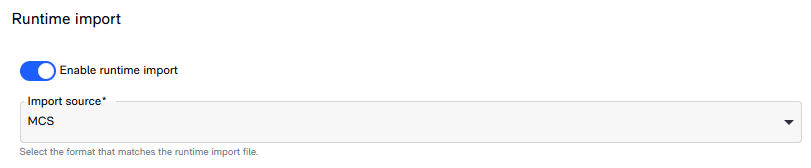
CCOM X now supports import of running hours via file upload (.DAT / .TXT) — reducing manual entry and making data handling faster and more reliable.
What’s included:
- Import of running hours directly from external systems
- Each running hour counter can be linked using an import reference field
- Department-level toggle to enable the feature
- Support for different file formats (initial focus on MCS, with flexibility for others like Kongsberg and Höglund)
Why it matters:
No more manual entry of running hours. Less risk of errors. A smoother connection between onboard systems and CCOM.
This is a big one, and if you cant wait to read more about it, simply click here.
CCOM X now supports import of running hours via file upload (.DAT / .TXT) — reducing manual entry and making data handling faster and more reliable.
What’s included:
- Import of running hours directly from external systems
- Each running hour counter can be linked using an import reference field
- Department-level toggle to enable the feature
- Support for different file formats (initial focus on MCS, with flexibility for others like Kongsberg and Höglund)
Why it matters:
No more manual entry of running hours. Less risk of errors. A smoother connection between onboard systems and CCOM.
📄 More Complete Document Printing
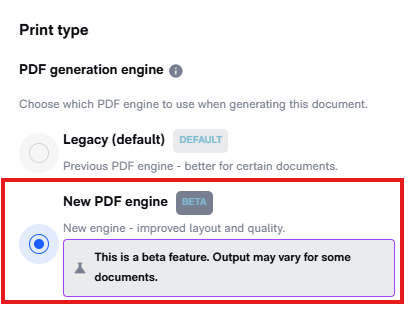
Printed documents are now closer to what you actually see on screen.
What’s new:
- Tables (lines) are now included when printing documents
- Improved handling of images and attachments in print
Why it matters:
Printouts are no longer missing key content — what you print is now actually usable.
Easier reading with previous and next buttons
 Finally, the buttons are in place. No more going in and out in the document module, you can now click "previous" or next", as it should be.
Printed documents are now closer to what you actually see on screen.
What’s new:
- Tables (lines) are now included when printing documents
- Improved handling of images and attachments in print
Why it matters:
Printouts are no longer missing key content — what you print is now actually usable.
Easier reading with previous and next buttons
👤 Responsible Visible Across Modules
You can now clearly see who is responsible directly in module overviews.
What’s new:
- Responsible roles are surfaced in overview screens across modules
Less guessing. Faster follow-up.
You can now clearly see who is responsible directly in module overviews.
What’s new:
- Responsible roles are surfaced in overview screens across modules
Less guessing. Faster follow-up.
🖱️ Work & Rest
Drag & Drop Time Registration
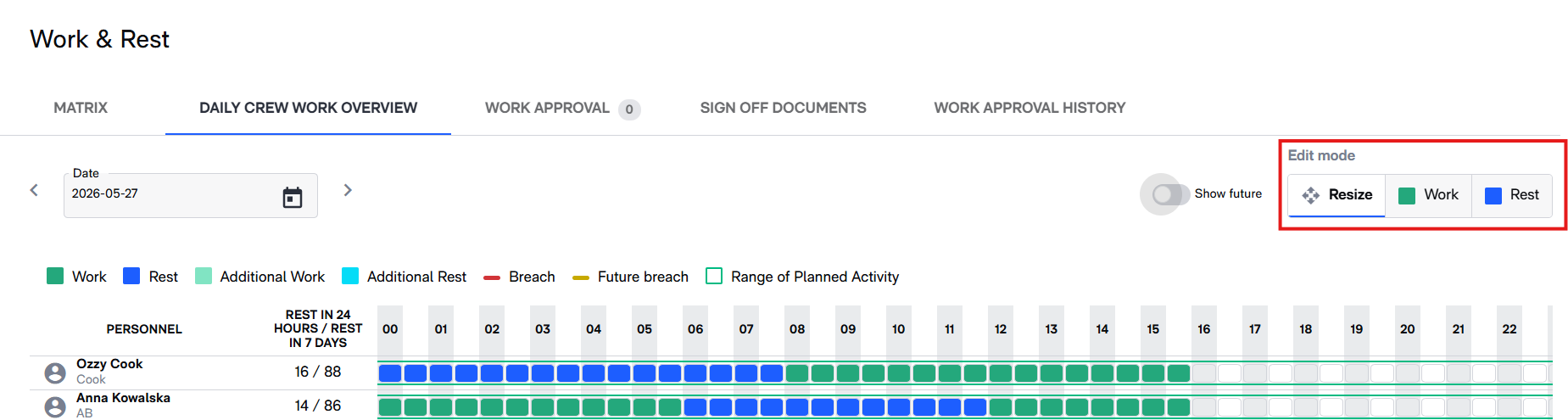
Time registration just got a lot easier, and you can read the updated "how to" by following this link.
You can now use drag & drop directly in Work & Rest, making it faster to adjust and register working hours.
Why it matters:
- Faster adjustments of planned and actual hours
- More intuitive interaction
- Less clicking and manual corrections
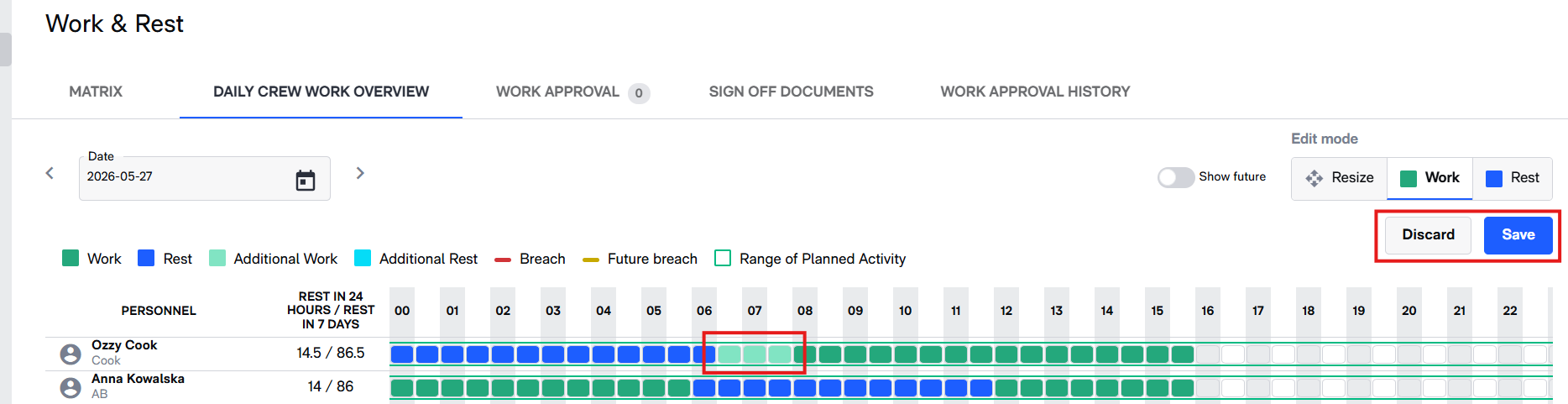
This is one of those changes you’ll feel immediately.
Time registration just got a lot easier, and you can read the updated "how to" by following this link.
You can now use drag & drop directly in Work & Rest, making it faster to adjust and register working hours.
Why it matters:
- Faster adjustments of planned and actual hours
- More intuitive interaction
- Less clicking and manual corrections
This is one of those changes you’ll feel immediately.
Sign-Off Overview
We’ve added improved visibility into sign-off documents in Work & Rest.
What’s included:
- Dedicated overview for sign-off documents
- Better insight into who has signed and what is pending
A clearer picture of compliance — without digging.
We’ve added improved visibility into sign-off documents in Work & Rest.
What’s included:
- Dedicated overview for sign-off documents
- Better insight into who has signed and what is pending
A clearer picture of compliance — without digging.
Handling Special Cases
Masters (MA) can now:
- Add a specific status to users who have left the vessel or refused to sign Work & Rest logs
This makes edge cases easier to handle and better aligned with real-world scenarios.
Masters (MA) can now:
- Add a specific status to users who have left the vessel or refused to sign Work & Rest logs
This makes edge cases easier to handle and better aligned with real-world scenarios.
📘 Workflow Improvements
🛠️ Maintenance – Faster and More Reliable
We’ve addressed performance and usability issues in Maintenance workflows.
Improvements:
- Reduced lag when adding runtime
- Smoother handling of job editing and updates
Less waiting, more doing.
We’ve addressed performance and usability issues in Maintenance workflows.
Improvements:
- Reduced lag when adding runtime
- Smoother handling of job editing and updates
Less waiting, more doing.
📋 Activity & Crewing – More Control
Working with activities is now more flexible and predictable.
What’s improved:
- Admins can now reopen and edit confirmed activities
- All activity changes are now logged for better traceability
Better control, without losing history.
Working with activities is now more flexible and predictable.
What’s improved:
- Admins can now reopen and edit confirmed activities
- All activity changes are now logged for better traceability
Better control, without losing history.
📑 Reporting & Crew Data – More Accurate Handling
We’ve improved how crew and reporting data is handled:
- Crew reports now allow updating of IMO Crew List beyond only current confirmed data
- Department handling and filtering is more consistent
More flexibility, less workaround.
We’ve improved how crew and reporting data is handled:
- Crew reports now allow updating of IMO Crew List beyond only current confirmed data
- Department handling and filtering is more consistent
More flexibility, less workaround.
🐞 Bug Fixes & Improvements
⚓ Work & Rest
- Fixed issue where “Back” button always returned to main page instead of previous view
- Corrected handling of additional time when shortening planned activities
- Fixed issue with filters being incorrectly included in backend requests
- Resolved missing sign-off button on documents in Admin Signed state
- Fixed issue where “Back” button always returned to main page instead of previous view
- Corrected handling of additional time when shortening planned activities
- Fixed issue with filters being incorrectly included in backend requests
- Resolved missing sign-off button on documents in Admin Signed state
👥 Shift & Manning (ABSM)
- Fixed issue where ending a trip attempted to update deleted planned activities
- Fixed issue where trips could not be opened if a user had paused employment
- Corrected arrival/departure dates in IMO Crew List header
- Fixed issue where ending a trip attempted to update deleted planned activities
- Fixed issue where trips could not be opened if a user had paused employment
- Corrected arrival/departure dates in IMO Crew List header
🛠️ Maintenance
- Fixed permission issue where users without proper read privileges could not edit maintenance jobs
- Resolved performance issue when adding runtime
- Fixed permission issue where users without proper read privileges could not edit maintenance jobs
- Resolved performance issue when adding runtime
📄 Documents & Printing
- Removed deleted pages (paxes) appearing in SafeSeaNet reports
- Fixed missing WebP/AVIF images in print output
- Removed deleted pages (paxes) appearing in SafeSeaNet reports
- Fixed missing WebP/AVIF images in print output
📋 Forms & Reporting
- Fixed issue where search results failed after a previous empty search
- Corrected display of custom properties in notification emails
- Fixed issue where search results failed after a previous empty search
- Corrected display of custom properties in notification emails
👤 Users & System
- Fixed issue where updated email addresses still appeared as confirmed
- Prevented pagination from appearing where it should not (e.g., when adding departments)
- Fixed issue where updated email addresses still appeared as confirmed
- Prevented pagination from appearing where it should not (e.g., when adding departments)
⚙️ Platform & Architecture
- Continued rollout of Angular Signals improvements
- Ongoing backend optimizations for stability and performance
- Continued rollout of Angular Signals improvements
- Ongoing backend optimizations for stability and performance
✅ Wrapping Up
May is about working smarter, not harder.
With automated running hours, drag & drop in Work & Rest, and smoother navigation across the system, this release removes a lot of small daily frustrations — and adds up to a much better flow.
As always, thanks for the feedback, and keep it coming!
May is about working smarter, not harder.
With automated running hours, drag & drop in Work & Rest, and smoother navigation across the system, this release removes a lot of small daily frustrations — and adds up to a much better flow.
As always, thanks for the feedback, and keep it coming!
Related Articles
CCOM X Release 2-26
Release Notes – February 2026 February’s release is focused on workflow improvements rather than new features or large‑scale rewrites. The goal is to make CCOM X easier and more efficient to work with—supporting smoother daily routines, fewer ...CCOM X Release 6 - 2026
CCOM X Update: Flexibility, Stability and Smarter Workflows This month is about making CCOM X more elastic to better accomodate changing operations aboard. Despite June being packed with vacations and planning days that tend to keep those of us ...CCOM X Release 3-26
Release Notes – March 2026 In the March release, we focused on improving existing features and fixing critical bugs to ensure a smoother and more reliable workflow. We have also enhanced the visual experience by introducing colours and a new matrix ...CCOM X Release 4 - 2026
? APRIL 2026 Clarity. Control. Fewer Surprises. This month’s release focuses on visibility and control — making it easier to understand what’s been read, what requires attention, and who is responsible. We’ve added long‑requested document tracking ...CCOM X Release 1-26
Release Notes – January 2026 New Year, New Insights. Happy New Year! We hope 2026 has started well for everyone at sea and on shore. While December was about laying the groundwork, January is about giving you control and oversight. We have listened ...